
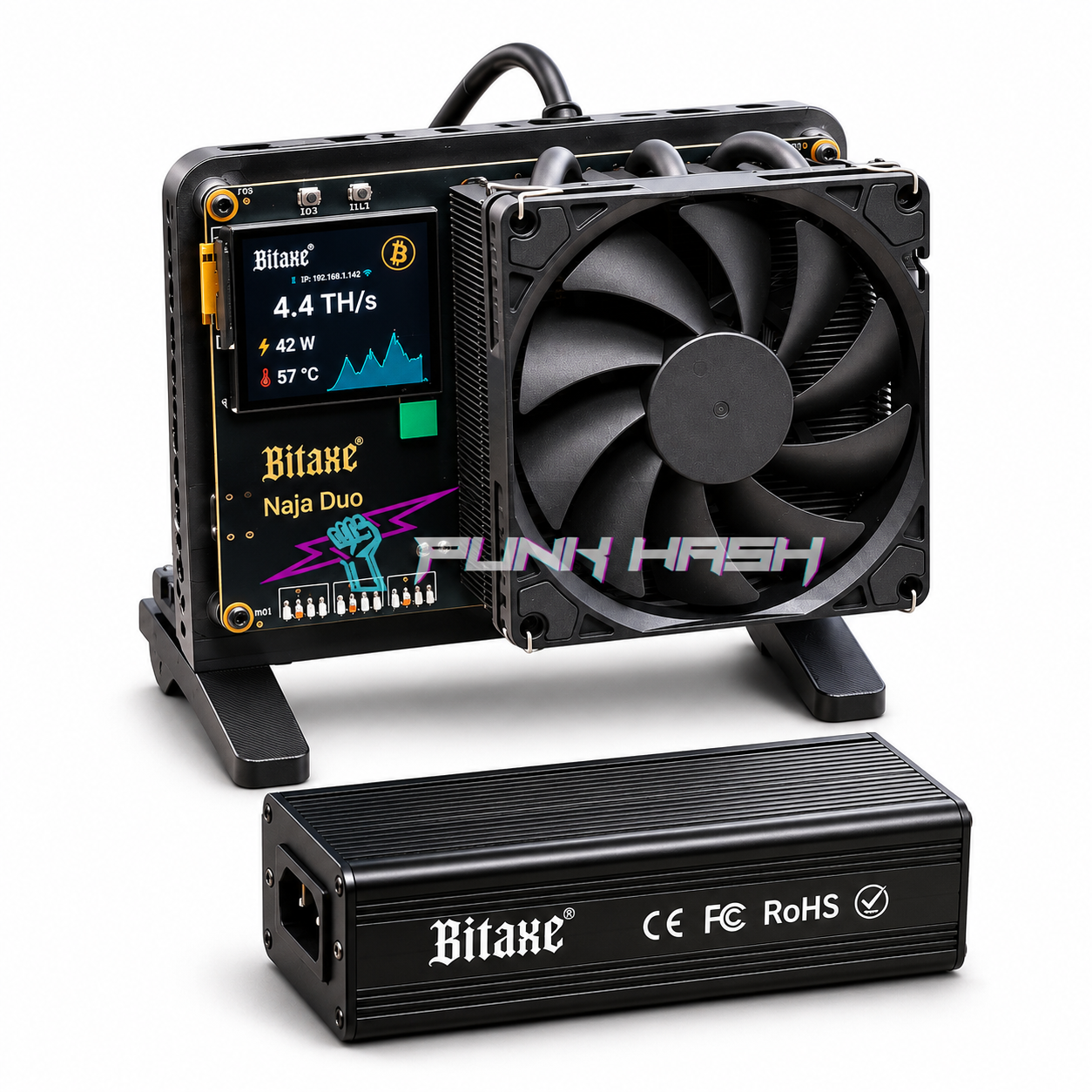

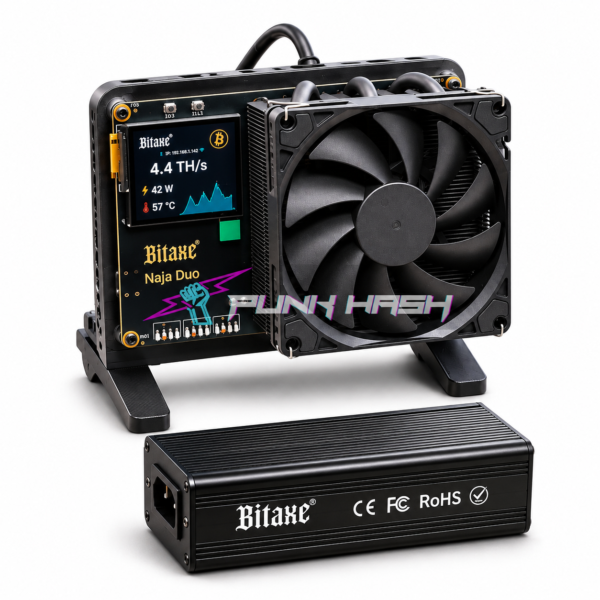
Bitaxe Naja Duo brings dual BM1373 ASIC mining to a desktop format for Bitcoin enthusiasts who want to run and monitor their own SHA-256 hardware. The pictured configuration combines an air-cooled miner, a color LCD and an external power supply. It is designed around two distinct operating choices: efficient default operation or a higher-power overclock profile.
Start with approximately 4.4 TH/s at 42W in default mode. The supplied product specification advertises up to 8.8 TH/s at about 103W when overclocked. The higher number is a tuning target, rather than the default operating specification. Achievable hashrate depends on the individual chips, firmware, voltage settings, cooling and room temperature.
Bitaxe Naja Duo specifications at a glance
| المنتج | Bitaxe Naja Duo desktop Bitcoin miner |
|---|---|
| ASIC architecture | Two BM1373 chips |
| خوارزمية التعدين | SHA-256 |
| Primary application | Bitcoin solo mining and hands-on learning |
| Default performance | Approximately 4.4 TH/s, 42W, 9.5 J/TH |
| Advertised overclock profile | Up to 8.8 TH/s, approximately 103W, 11.7 J/TH |
| العرض | 1.9-inch color LCD, 170 × 320 resolution |
| Firmware interface | ESP-Miner / AxeOS; use a build matching the board revision |
| التبريد | Fan and heatsink assembly; confirm final fan configuration |
| Power supply | External PSU included in the pictured package; confirm label and destination plug |
These are approximate product figures. Board-reported power and electricity measured at the outlet can differ because of PSU losses and the operating configuration. Efficiency figures describe the stated profiles, rather than a guaranteed measurement for every unit.
Choose the mode that fits your home setup
Default mode: an efficient starting point
The default profile is the sensible baseline for initial setup and a stable temperature check. At the stated 42W figure, continuous operation represents approximately 1.01 kWh per day before any difference in wall-power measurement. Multiply measured daily consumption by your own electricity tariff when comparing operating costs.
Overclock mode: more hashrate with more heat
Moving from 4.4 to 8.8 TH/s doubles the advertised hashrate, while the stated power rises from 42W to 103W. That changes the efficiency from about 9.5 to 11.7 J/TH. More hashrate therefore does not mean better energy efficiency. Validate temperatures, accepted shares and stability after each adjustment, and use only settings supported by the supplied configuration.
AxeOS monitoring and first setup
Use the local AxeOS interface to review the miner configuration and operating readings. Before connecting the unit, check the PSU output label, connector and regional mains plug. Place the miner on a stable surface with open space around the intake and exhaust, then follow the supplied network and pool-configuration instructions.
Enter your own Bitcoin payout address and the pool details you intend to use. Confirm that shares are being accepted and that temperatures remain stable at the default profile before tuning. For firmware updates, identify the board revision and use the corresponding release from the official ESP-Miner project. Open-source design information is available from the Bitaxe Naja Duo hardware repository; project files are not a substitute for the supplied unit’s operating instructions.
Bitaxe Naja Duo buying questions
Is 8.8 TH/s the normal default hashrate?
No. This configuration is specified at approximately 4.4 TH/s and 42W in default mode. The 8.8 TH/s figure refers to an advertised overclock profile, with approximately 103W stated consumption and appropriate cooling.
Does a solo miner provide regular Bitcoin payouts?
Solo mining does not provide a fixed payout schedule. Finding a block is probabilistic and depends on your share of network hashrate and the mining arrangement. Running this desktop miner for a particular number of days does not guarantee a block, income or a return on the purchase price.
Is the power supply included, and which plug do I need?
The package presented here includes an external power supply. Tell PunkHash the destination country and required plug type before dispatch. Confirm the actual input and output labels, connector, cable and package contents rather than assuming that another seller’s PSU specification applies to this version.
How does this compare with other Bitaxe miners?
Compare the ASIC generation, default hashrate, power consumption, cooling and supplied accessories. You can review our بيتاكس غاما 602 for a smaller desktop option, or compare a different dual-chip model with the بيتاكس جاما دو 650. A shared Bitaxe name does not mean identical firmware targets, power supplies or performance.
Order the configuration that matches your requirements
For a Bitaxe Naja Duo enquiry, send the quantity, delivery country, preferred operating profile and plug requirement. PunkHash can confirm the package, current lead time and shipping quotation before payment. Contact PunkHash about your Bitaxe Naja Duo setup to discuss a single desktop unit or a larger order.
العملاء الذين شاهدوا هذا المنتج شاهدوا أيضًا









المراجعات
مسح الفلاترلا توجد مراجعات بعد.