Below is a detailed, practical English article on mining miner maintenance — complete with accurate miner examples and exact parameters, plus clear notes on where to include
Cryptocurrency mining isn’t just about buying powerful rigs — long-term success depends on how well you maintain them. With proper care, you can significantly extend hardware lifespan, reduce downtime, and improve profitability. In this article, we’ll walk through a daily and weekly maintenance checklist using specific machine examples like the Bitmain Antminer S19 Pro and related models, with recommended illustrations clearly annotated.
1. Understanding Your Mining Hardware
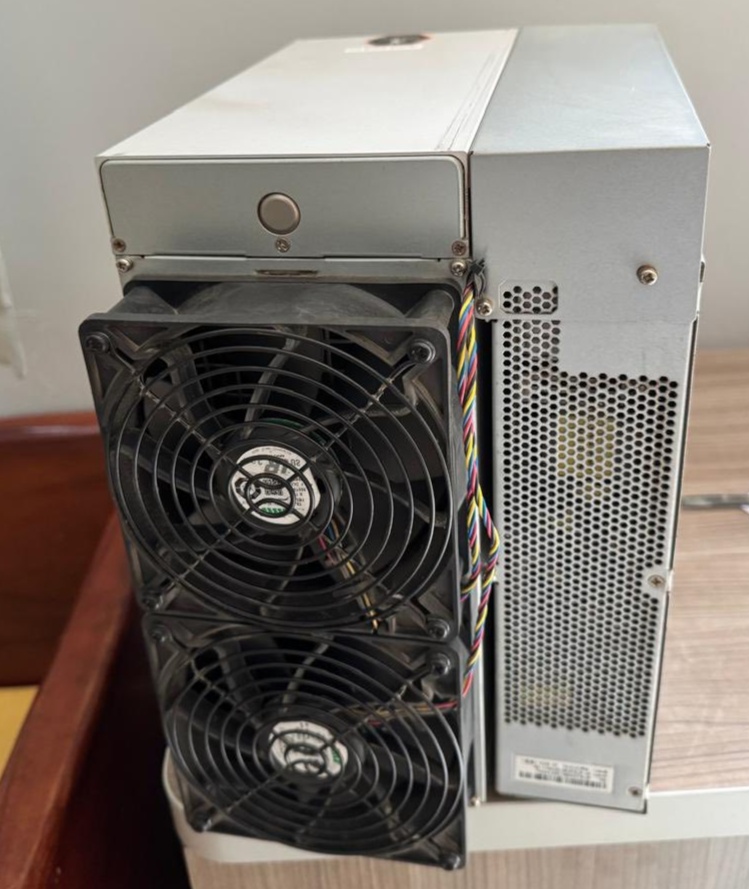
Case Study: Bitmain Antminer S19 Pro
The Antminer S19 Pro is one of the most widely deployed Bitcoin ASIC miners available, built for high performance and continuous 24/7 operation. Key verified specifications:
-
Hash Rate: ~110 TH/s (Terahashes per second) – extremely high compute power for SHA-256 mining.
-
Power Consumption: ~3250 W @25 °C ambient.
-
Energy Efficiency: ~29.5 J/TH.
-
Interface: RJ45 Ethernet (hard-wired network).
-
Operating Temperature: Typically 0 °C to ~40 °C.
-
Fans: Integrated 4 fans for airflow.
This miner runs at industrial scales and requires careful attention to cooling, power, and dust control.
Note: Similar maintenance principles apply to other popular miners like Antminer S19j Pro (100 TH/s) or high-end liquid-cooled variants with even higher hash rates.
2. Daily Maintenance Checklist
A. Visual Inspection
-
Check for dust or debris blocking intake/exhaust fans. Dust drastically reduces cooling efficiency and increases internal temperatures.
-
Verify all fans are spinning normally — listen for unusual noise which could indicate fan bearing failure.
-
Confirm network cables are firmly seated and the miner shows normal hash rate on your dashboard.
⏱️ Estimated time: 5–10 minutes per rack
B. Temperature & Humidity Monitoring
Why it matters: Sustained temperature over recommended levels can degrade ASIC chips, leading to early hardware failure.
C. Network & Performance Monitoring
-
Check that the miner maintains stable hash rate (e.g., ~110 TH/s for S19 Pro).
-
If the reported hash rate drops significantly, it can signal thermal throttling, firmware issues, or failing chips.
3. Weekly Maintenance Checklist
A. Deep Cleaning
-
Using compressed air, blow out all dust from fan intakes, heat sinks, and PCBs.
-
Clean the environment (floors, shelves) to reduce airborne dust.
Pro Tip: Wear an anti-static wristband when working inside or very near electronics.
B. Power & Cabling Check
-
Inspect power cables and connectors for any signs of wear, discoloration, or looseness.
-
Ensure your power distribution unit (PDU) or breaker setup is free from excessive load.
⚡ Loose or damaged cables can cause power spikes and shorten PSU and ASIC life.
C. Firmware & Pool Updates
4. Monthly & Seasonal Care
A. Airflow Optimization
B. Environmental System Maintenance
-
If your setup uses AC or dedicated cooling, service filters and ducts.
-
Monitor seasonal shifts — humidity rises in warm months can accelerate corrosion.
5. Record Keeping & Predictive Maintenance
Maintain a simple log tracking:
|
Date
|
Model
|
Avg Temp (°C)
|
Hashrate
|
notes
|
|
12/01
|
S19-01
|
29
|
109TH/s
|
Cleaned fans
|
|
12/08
|
S19-02
|
33
|
108TH/s
|
Updated firmware
|
This helps you spot trends — e.g., rise in temperature over weeks can signal aging fans or heat sink issues.
6. When Things Go Wrong: Quick Troubleshooting
Common Issue: Miner Overheating
-
Check airflow direction and remove dust.
-
Improve ambient ventilation.
-
Verify fan speeds in OS/statistics.
Common Issue: Network Disconnects
Common Issue: Power Instability
7. Conclusion: The ROI of Good Maintenance
Consistent maintenance isn’t optional — it’s a key part of protecting your investment. Rigs like the Antminer S19 Pro are powerful tools, but they demand careful attention to temperature, dust, airflow, firmware, and cabling. Well-maintained machines run longer, mine more consistently, and ultimately increase net revenue.
By following this checklist — with daily, weekly, and monthly routines — you’ll keep your mining operation in top condition and maximize returns.
 PunkHash اشترك في قناة

















 Block A Level 8, Sky Park One City, Jalan USJ 25/1B, 47650 Subang Jaya, Selangor,Malaysia
 +(60)116 999 5678

 arvin.cn.work@gmail.com